A field technician stands in a concrete hospital basement, tries to log an emergency valve inspection, and watches the app freeze on a spinning wheel. When connectivity returns ten minutes later, thirty queued entries have vanished into a failed HTTP POST request.
Building a SaaS mobile application is not a matter of wrapping your existing web dashboard in a responsive viewport or an Electron wrapper. Mobile devices live on hostile networks, face aggressive operating system memory purges, and run on hardware you cannot control.
Treating the mobile client as a casual viewport destroys customer trust and stalls enterprise sales cycles before your pilot finishes.
If your software handles mission-critical operational records, local data integrity determines whether your product survives field trials. When data drops, customers leave. Below we’ll cover when a mobile client is the product rather than an accessory and where a responsive web app still wins, along with the architecture decisions for offline sync, multi-tenant caching and authentication and the app store economics that determine whether your field release survives contact with real networks.
Reading time: 11 min
Key points
- If your users complete their primary jobs in the field, the mobile client is the product, and it demands dedicated architectural respect from sprint zero.
- Offline-first design persists every interaction locally in SQLite, queues mutation events, and synchronizes bidirectionally once connectivity returns.
- Keep B2B billing and seat allocation on the web, and reserve in-app purchases for self-serve single-seat subscriptions.
- Legacy binary versions stay active in the field for months, so API contracts must evolve additively under semantic versioning.
Table of contents
When a SaaS mobile application is the product rather than an accessory
A SaaS mobile application represents your core product when users complete their primary jobs away from a desk. Field service technicians, on-call doctors, and logistics managers rely on handheld devices to complete daily work. For these operators, recurring software access matters far more than a one-time desktop installation. If your business depends on continuous subscription revenue from active field teams, the mobile client is your company.
Most teams treat mobile as a shrunken web dashboard. We treat it as a distributed database node.
Treating handheld software as a secondary companion introduces crippling technical debt. Background operating system execution limits, severe battery conservation rules, and intermittent connectivity become painful architectural emergencies after launch. When engineers fail to design around these hardware boundaries early, battery drain escalates and background processes terminate abruptly. The handheld client demands dedicated architectural respect from sprint zero.
Recognizing when a responsive web app beats native for the first release
A responsive web app validates real customer demand faster than any native binary. If your product workflow centers on standard form inputs and financial dashboards with light notification review, a browser experience proves weekly active usage without distribution overhead. Founders often burn capital building dual iOS and Android clients before confirming that anyone needs handheld access. Testing core workflows on mobile browsers provides immediate usage data while preserving engineering velocity.
Premature native development triggers a punishing mobile tax. App store review delays stall critical bug fixes, while device testing matrices expand your QA timeline from hours to weeks.
This lean browser strategy fails when workflows require background geolocation, barcode scanning with hardware decoders, or deep mobile device management controls. If users must work inside warehouses with zero cellular coverage, browser caching fails.
The minimum bar for mobile-ready web
Meeting production standards on the mobile web requires sub-second interaction speed, persistent authentication tokens, and defensive error boundaries. You need aggressive static asset caching and graceful degradation whenever network calls time out.
Where native or cross-platform becomes mandatory
Native or cross-platform codebases become mandatory the moment workflows rely on physical hardware sensors or strict offline guarantees. Industrial inventory management, emergency dispatching, and secure transportation tracking cannot tolerate the execution sandbox of a mobile web browser. These environments demand direct access to the camera pipeline for rapid barcode scanning, background geofencing, and hardware keystore encryption.
Choosing between native and cross-platform without ideology
Engineering leadership must evaluate team capabilities and long-term UI maintenance rather than chasing language popularity. Frameworks like Flutter and React Native handle complex B2B state management cleanly, but deep Bluetooth peripheral integrations often demand platform-specific Swift and Kotlin layers.
Every mobile binary comes with rigid distribution rules that reject web-style hotfixes.
Before picking a framework, compare how each technology path balances operational speed against device hardware control.
| Architecture Path | Hardware Sensor Access | Offline Storage Capability | Release Velocity |
|---|---|---|---|
| Responsive Web | Limited browser APIs | IndexedDB with storage caps | Instant deployment |
| Cross-Platform | High via platform bridges | Encrypted local SQLite | App store review cycles |
| Native Swift or Kotlin | Direct hardware drivers | Full filesystem and keystore | App store review cycles |
Attempting to patch offline capabilities onto an existing web codebase fails because local synchronization demands dedicated data structures from day one.
Multi-tenant data boundaries that survive mobile caching
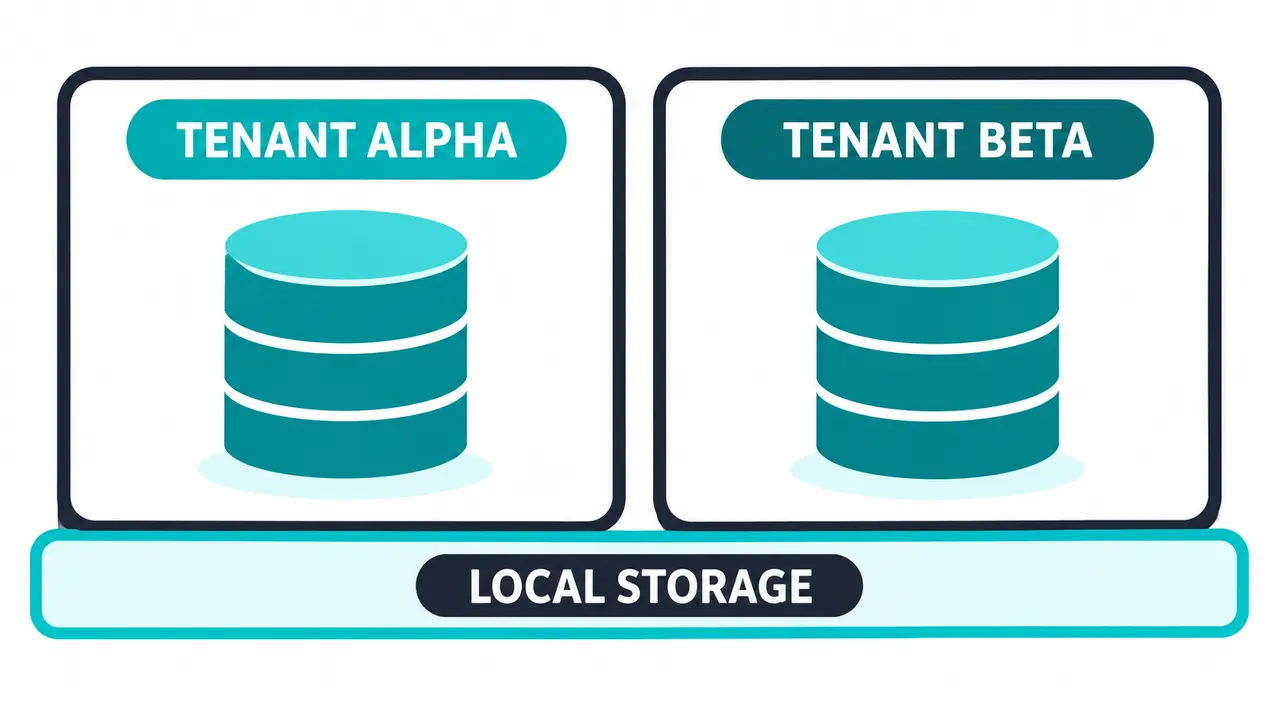
Multi-tenancy in mobile SaaS requires enforcing strict isolation inside local client storage just as rigorously as on backend servers. Many enterprise applications allow users to belong to multiple organizations or share corporate tablets across shift workers. When an operator switches organizations or hands a tablet to a colleague, sloppy local databases risk leaking confidential records across customer accounts.
Separate cache namespaces protect enterprise data integrity.
Every SQLite table must enforce tenant scoping keys on all stored rows, queries, and background synchronization jobs. If a user logs out, your client application must either purge local databases completely or isolate subsequent records into encrypted tenant-specific partitions.
The organization switch test
Run this practical QA test during staging. Log into Organization Alpha and disconnect cellular data. Draft five operational records before reconnecting to the network and switching accounts to Organization Beta. If any cached Alpha records surface in Beta views, reject the build immediately.
Authentication that matches B2B reality on mobile
Enterprise authentication on mobile devices requires a delicate balance between identity governance and field operational efficiency. Corporate security teams demand single sign-on through Okta or Microsoft Entra ID alongside multi-factor authentication. Operational staff working in cold warehouses or hospital corridors cannot enter one-time passcodes every ten minutes without abandoning the software entirely.
Biometric verification bridges this gap by wrapping long-lived, cryptographically secure refresh tokens in local hardware keystores. The mobile client securely exchanges fingerprint or facial scans for short-lived API access tokens without bothering the user.
Network connections drop constantly during transit, so token refresh routines must implement defensive retry logic with jitter. If an API rejects an expired token while a device travels through a dead zone, the app must queue background requests instead of forcing an immediate logout.
Produce an authentication state diagram and a threat model review during early product discovery.
Offline-first is a product decision rather than a feature request
An offline-first architecture demands that your mobile application treat local storage as the primary source of truth. Consider an industrial maintenance technician logging pump repairs across remote oil fields. That technician must draft detailed work orders and attach equipment photos while collecting customer signatures in the field.
Applications that merely cache last-known API responses fail catastrophically during field operations. When workers cannot create or modify records offline, their daily operations grind to an absolute halt. True offline-first design persists all user interactions locally in SQLite, queues discrete mutation events, and executes bidirectional synchronization once connectivity returns.
Conflict rules you can explain to support
Last-write-wins is dangerous for collaborative B2B records. If two technicians update the same asset inventory offline, naive timestamp sorting silently destroys someone’s work. Domain-specific merging rules preserve critical operational safety by flagging concurrent edits for manual administrative review.
Sync design that does not corrupt customer trust
Reliable synchronization requires explicit state tracking across every stored entity and an API designed for intermittent transport. Mobile network requests fail halfway through execution, leaving clients uncertain whether the server processed a payload. Automated client retries generate duplicate invoices, double-booked appointments, and corrupted inventory balances when the server lacks strict idempotency keys.
The following state machine prevents data corruption when synchronizing records over hostile mobile networks.
| Local Record State | Client Behavior | Network Action | Server Validation |
|---|---|---|---|
| Draft Local | Writable by user | None | Not applicable |
| Pending Sync | Locked for editing | Send with idempotency key | Version check against database |
| Sync Conflicted | Read-only warning | Pull server state | Execute domain merge rules |
| Synced Clean | Normal read and edit | Idle | Matches primary source of truth |
Every database record must carry a local mutation version and a unique transaction UUID. When the synchronization engine encounters a network failure, it pauses the queue using exponential backoff to preserve device battery life.
Your backend API must process batch sync payloads independently so a single malformed record does not reject thirty valid updates. Build a comprehensive sync specification and edge-case test matrix covering subway tunnels, airplane mode toggles, and cell tower handoffs before writing operational client code.
Silent data overwrites permanently destroy customer trust.
Push notifications as a workflow signal instead of a growth hack
In business software, push notifications serve as precise operational triggers that pull workers back to critical workflows. Alerting an engineer to an infrastructure outage on PagerDuty, dispatching a utility crew to a downed power line, or requesting rapid executive purchase approval justifies a mobile notification. If you spam users with engagement prompts or marketing summaries, they disable notifications at the operating system level.
Apple Push Notification service and Firebase Cloud Messaging never guarantee delivery timing.
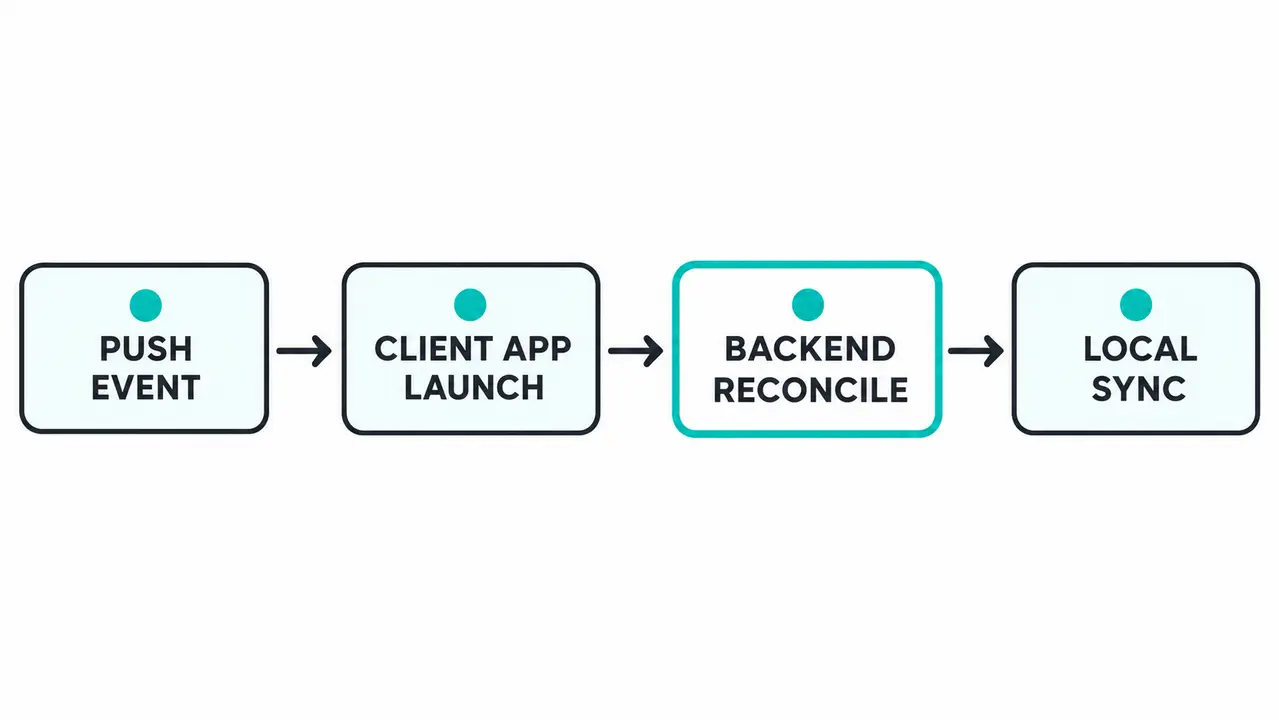
Operating systems throttle background transport when devices enter low-power modes or sit idle in pockets. Because push packets drop without warning, your mobile app must reconcile its internal state against the backend every time a user opens the application. Provide granular notification preference panels so users choose which events trigger immediate alerts.
Keep payload text concise, informative, and actionable.
Subscription mechanics that do not break your entitlement model
A subscription app demands a unified entitlement architecture that remains consistent across mobile app stores, web payment processors, and backend role databases. StoreKit on iOS and Google Play Billing manage in-app transactions, but your backend server remains the sole authority for product access. Entitlement bugs happen when payment succeeds on the device yet backend webhooks fail to grant the corresponding organization role.
Treat app store billing mechanisms as rigid external constraints rather than simple checkout plug-ins. Your backend must verify cryptographic receipts directly with Apple and Google servers before activating software tiers.
Trials, renewals, and grace periods in plain language
Engineering teams must model subscription lifecycles so support representatives can resolve billing inquiries effortlessly. If a customer’s credit card is declined during an enterprise renewal, the system should trigger a fourteen-day grace period while maintaining full mobile access.
Clear entitlement logging prevents embarrassing access denials.
When app store billing conflicts with B2B sales motion
App store billing structures clash with the reality of corporate software procurement. Enterprise clients demand unified annual invoicing, net-thirty payment terms, and negotiated master services agreements. In consumer software, the person who taps the screen pays the bill. In enterprise software, the central finance department pays the invoice while three hundred employees install the application on field devices.
Forcing B2B users to buy software licenses through in-app purchase flows alienates procurement departments. Apple and Google take a platform fee while concealing buyer identity and preventing customized tax exemptions.
Keep your commercial billing and seat allocation on the web. Mobile clients should only require an organizational login that checks membership status against your web-managed account. You should limit in-app purchases to self-serve single-seat subscriptions, ensuring complex seat reassignments and team departures remain managed through your administrative portal.
API design for mobile versions that linger in the wild
Deploying a web application updates every active user on their next browser refresh. Deploying a mobile application leaves dozens of legacy binary versions active in the field for months. Enterprise fleet managers often lock down employee devices, preventing automated app updates until internal committees review binary changes. If your backend engineers push breaking database modifications or alter JSON response payloads, outdated mobile clients crash immediately.
Maintain strict backward compatibility across your API contracts using semantic versioning and additive schema evolution. Never remove JSON fields, alter existing data types, or enforce new required parameters on active production endpoints. Use server-side feature flags and client capability headers to route legacy versions to compatible data handlers safely.
Draft an explicit API deprecation policy signed by both engineering and product leadership. Enforce minimum version requirements through a non-blocking upgrade notice that gives corporate IT departments ninety days to update their fleets.
Data privacy and device security in real-world mobile fleets
Mobile software security extends far beyond securing backend API endpoints. Handheld hardware travels through airports, rides in delivery trucks, and connects to unsecured public Wi-Fi networks. The risk categories documented in the OWASP Top 10 highlight how broken access control and cryptographic failures expose enterprise assets to unauthorized extraction.
When mobile devices cache sensitive client records locally, physical theft becomes a severe compliance vulnerability.
Mitigate physical tampering by encrypting local SQLite databases using SQLCipher with keys derived from the platform hardware keystore. Implement root and jailbreak detection libraries that restrict sensitive operations on compromised operating systems.
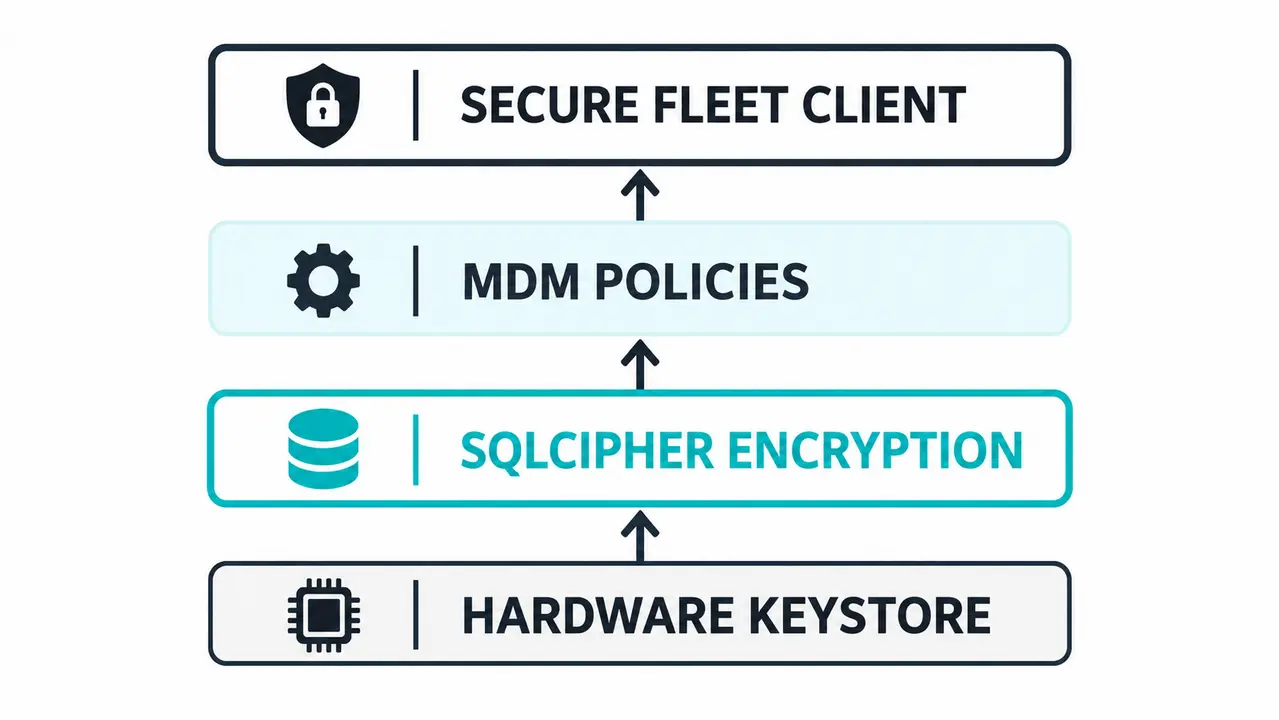
Your mobile client must integrate cleanly with corporate mobile device management platforms like Microsoft Intune and VMware Workspace ONE. Establish automated data retention policies that wipe cached data after thirty days of inactivity or upon receiving a remote revocation command.
Observability that helps you debug mobile SaaS in production
Debugging a distributed mobile SaaS platform requires comprehensive observability spanning the client device, network edge, and backend microservices. Standard web analytics tools track screen views but fail to explain why a background sync worker failed silently in a remote parking lot. Without detailed telemetry tagged by client version, your engineering team wastes valuable sprint cycles trying to reproduce hardware-specific bugs.
Capture structured client logs covering sync queue latency, conflict resolution outcomes, and local database migrations. Tag every API request with client binary versions and operating system releases to isolate regressions caused by specific vendor updates.
Establish a strict bug reporting standard for your customer support organization. Every escalated ticket must automatically record the device model, operating system build, and the timestamp of the last successful sync. This telemetry transforms vague customer complaints into actionable stack traces.
Release engineering built for app store latency
Deploying mobile software demands staged rollouts, automated kill switches, and server-side feature flags because binary review cycles introduce uncontrollable release delays. Following the secure development principles published in the NIST SP 800-218 guidelines helps engineering organizations maintain rigorous release governance across continuous delivery pipelines. If you discover a catastrophic regression in production, Apple and Google will not expedite your bug fix instantly.
Phased rollouts protect your broader user base from unexpected defects. Release new binary versions to one percent of your users initially, expanding gradually to full deployment over seven days.
Local SQLite migrations present the highest operational risk during an upgrade. If a schema migration script fails on an older device, the local database corrupts and the app crashes on launch. Test automated database upgrade paths against five consecutive legacy releases before submitting updates for store review.
The admin surface that makes mobile SaaS operable
A high-quality mobile application fails in the enterprise market without a comprehensive web administration portal. Corporate IT administrators require specialized interfaces to manage organizational settings, provision seat licenses, and monitor mobile device fleets. Skipping admin tooling shifts operational overhead directly onto developers, who must run manual database scripts whenever a customer needs an MFA reset.
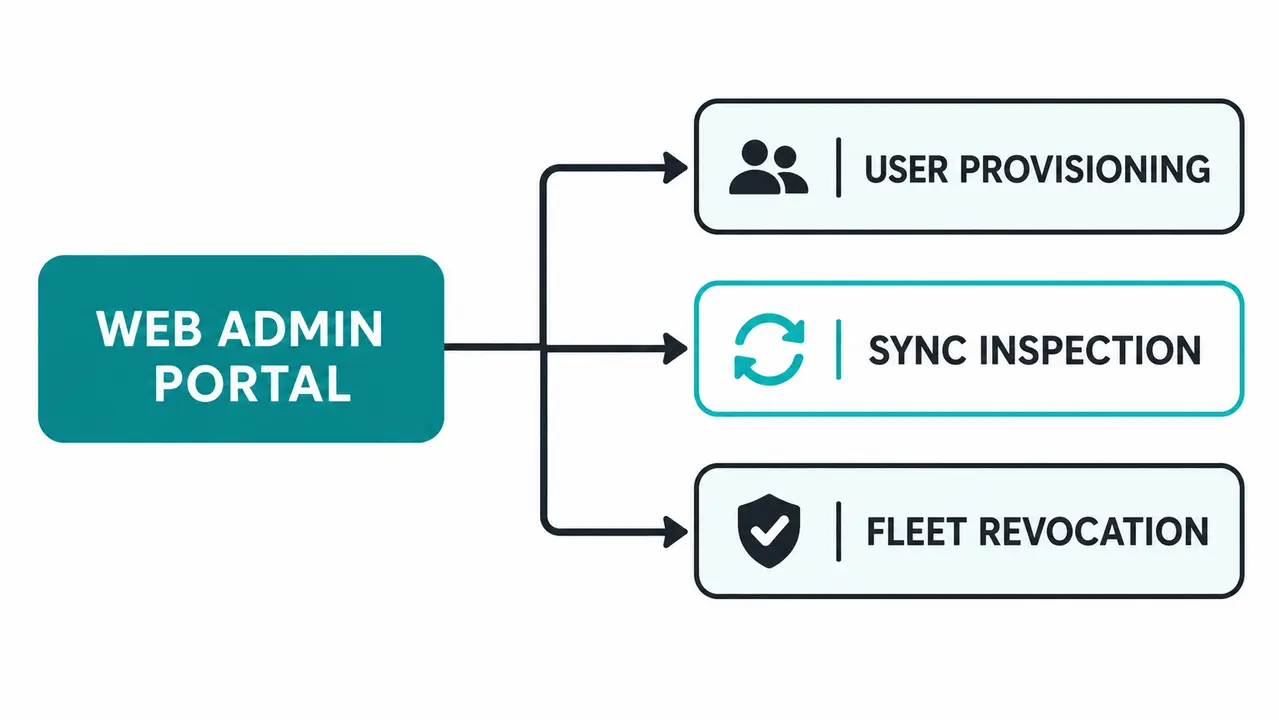
A production administration console must support user provisioning, session revocation, and role-based access controls across corporate divisions. Your support staff should have tools to inspect sync queues, diagnose stuck client states, and trigger remote data purges on lost devices.
Conduct an operations requirements workshop before writing frontend code. Logging every administrative modification in an immutable audit trail ensures compliance with enterprise security requirements while keeping your engineering team focused on core product development.
MVP scope that avoids building the same product twice
Building a successful initial mobile release requires defining a narrow workflow slice with uncompromising technical integrity. Founders frequently fail by trying to replicate their entire desktop web application across a dozen mobile screens. The result is a sluggish, half-finished application that syncs poorly and frustrates early adopters.
A resilient minimum viable product focuses on one user role solving one critical job. Build one rock-solid offline workflow, one dependable notification trigger, and one clear confirmation screen. That narrow scope allows your engineers to master complex synchronization protocols and local data encryption without drowning in UI components.
Map every mobile screen directly to backend service boundaries and specific data ownership models before development begins. Measure initial MVP success by the completion rate of the targeted field task rather than arbitrary feature counts. If field technicians can complete twenty consecutive inspections in a cellular dead zone without data loss, your core architecture is validated.
Engagement models that fit a boutique embedded team
Building an enterprise cloud-based app requires tight alignment between system architecture and handheld client execution. As documented in World Bank trade indicators, international demand for specialized computer and information services continues expanding as companies seek high-caliber engineering capacity. Generic outsourcing shops assemble disconnected developers who treat mobile delivery as an isolated coding exercise.
Sentice structures collaboration through embedded pods that own the underlying architecture. Our engineers sit together in one office in Skopje, North Macedonia, embedding directly into your technical organization from week one. When Sentice engineers build sync engines, we test local database schemas against physical hardware before pushing code.
We provide dedicated software engineering teams that take full ownership of local caching, synchronization engines, and background release pipelines. Instead of fragmenting work across detached contractors, our pods deliver end-to-end software solutions that integrate cleanly with your backend stack.
Understanding how boutique partnerships accelerate tech team growth helps technical founders scale engineering throughput without sacrificing code quality or operational discipline.
Get the mobile architecture right before the first commit
A short architecture review saves months of rework when your roadmap includes offline sync, multi-tenant caching, or app store release engineering. Our engineers will look at your schemas, sync contracts, and delivery constraints and tell you where the risks are.
Frequently asked questions
What makes a mobile app truly SaaS instead of just an app with a backend?
A mobile SaaS product delivers ongoing value through continuous multi-tenant services, automated workflow updates, and subscription entitlement enforcement. Simple connected apps use remote databases for basic storage, but SaaS clients participate directly in complex organizational permissions and distributed data synchronization.
How do you handle API versioning when users do not update their mobile apps?
We deploy additive API contracts that maintain backward compatibility across older schemas without breaking active clients. Server-side feature flags and client capability headers allow backend microservices to adapt data payloads dynamically based on the incoming application build.
What is the biggest risk of building a mobile companion for an existing web SaaS?
The greatest danger is assuming web data models work reliably on mobile devices. Desktop web applications rely on persistent low-latency connections, whereas mobile clients face frequent disconnections that trigger sync conflicts and data corruption without dedicated offline-first architectures.
Can you use app store subscriptions for a B2B mobile SaaS?
Consumer app store billing conflicts with corporate purchasing because enterprise buyers require centralized procurement, custom invoicing, and flexible seat management. Default to web-based account billing for corporate clients and reserve in-app purchases for individual self-serve subscriptions.
How long does it take to build a mobile SaaS MVP?
A focused workflow slice covering one user role, local offline storage, and bidirectional synchronization typically requires eight to twelve weeks of disciplined engineering. That timeline includes thorough security reviews, sync protocol testing, and staging deployment validation.
What security standards should a mobile SaaS app follow?
Mobile applications must implement encrypted local storage with SQLCipher, secure hardware keystore key management, and defensive certificate pinning. Enterprise deployments must also support mobile device management configuration policies and automated remote data wipe capabilities.
Next steps for your mobile SaaS delivery plan
Map your current web backend architecture against mobile constraints like offline sync, multi-tenant caching, and app store latency before writing any client code. Return to the hospital basement inspection scenario and verify whether your existing database schemas support conflict resolution without an active connection. Choosing between responsive web and native code determines your delivery speed, ongoing maintenance overhead, and enterprise adoption rate. Is your team prepared to own mobile release engineering and background data synchronization contracts in production?
About Sentice

Sentice is a boutique software engineering partner founded in 2013 by Roni Levi and Martin Petkovic, now headquartered in Skopje, North Macedonia. Rather than supplying individual developers, we build embedded teams that blend with a client’s culture, tech stack and goals, working together from a single office under our own technical leadership. We deliver dedicated software engineering teams, end-to-end software solutions, product development, and system and embedded engineering, and we act as technical advisors across the full development lifecycle, from specification and architecture through development, testing and support. We use AI coding tools across every project, and we help clients integrate AI into their own products through chatbots, MCP services, connected application layers and workflow automation. Some of the clients we started with more than a decade ago are still building with us today.
Email: info@sentice.com | Phone: +389 70 307 837