
Your engineering board shows three blocked tickets because the mobile team is waiting on an undocumented authentication endpoint. Your public App Store release date is twelve business days away.
Selecting iOS app development services is rarely about finding engineers who write Swift. It is about protecting your deployment schedules, your backend contracts, and your engineering culture. Choosing a partner without evaluating your operational boundaries turns a straightforward mobile initiative into an unmaintainable codebase that consumes your internal resources.
Every mobile codebase eventually reflects the discipline of the team that assembled it.
This guide covers what a complete iOS engagement actually includes, where delivery timelines slip in practice, and how to evaluate a partner before you commit your release train to them.
Reading time: 12 min
Key points
- Match an external team to your existing backend architecture, deployment cadence, and maintenance plan before you evaluate portfolios or mockups.
- A complete engagement runs from technical discovery and native interface design through Swift engineering and backend integration to regression testing and App Store Connect distribution.
- Standardizing on an OpenAPI specification before UI work keeps mobile teams unblocked and exposes latency issues before end-to-end testing.
- Dedicated engineering pods offer the strongest balance of autonomy and governance for scaleups, with low handover risk and deep integration.
Table of contents
Choosing iOS app development services when your product already has constraints
Selecting iOS app development services requires matching an external team to your existing technical foundations. Your backend architecture, deployment cadence, and post-launch maintenance team dictate the boundaries of the engagement. Evaluating a vendor against a generic portfolio ignores whether their branching strategy matches your trunk-based development or how their pull request reviews operate.
We begin evaluations by handing candidate teams a one-page current state brief. Alongside repository permissions and CI pipeline runtimes, that document details existing API gateway constraints and a target crash-free session rate above 99.5 percent. If an engineering partner glosses over those constraints to focus on mockups, you have identified an immediate operational mismatch.
Picking a partner based solely on visual presentations leads to integration gaps mid-build. It creates severe code ownership traps once the client application must communicate with your authentication service under strict production latency limits.
What iOS app development services usually include in a real engagement
A complete mobile scope runs from technical discovery and native interface design through Swift engineering and backend integration. It also includes regression testing alongside distribution pipelines through App Store Connect. When scaling engineering teams evaluate end-to-end software solutions, mobile development cannot sit in isolation from backend services. Treating an engagement as simple feature coding creates an unintegrated product that breaks under production traffic.
The deliverables that separate engineering from code delivery
Professional delivery provides concrete operational artifacts alongside functional screens. These include a modular repository structure with documented environment variables, automated continuous integration pipelines via Fastlane, and SwiftLint configurations. You also receive architecture decision records, prioritized sprint backlogs, and comprehensive test plans.
Vendors that deliver raw code without established module boundaries create parallel workflows that never merge cleanly into your primary branch. These engineering assets let your internal staff inspect, compile, and deploy the application without vendor intervention.
Code volume without operational structure is an expensive liability.
Where teams underestimate discovery for iPhone app development
Discovery work frequently collapses when teams treat mobile as just another web client. Disciplined iPhone app development demands early architectural agreements on offline data persistence, background task scheduling, and device hardware utilization before writing user interfaces. Teams that skip these considerations spend their launch cycle fixing synchronization race conditions and memory spikes.
A functional discovery phase produces a user journey map tracking the first thirty minutes of application usage. This document maps network transitions, state restoration when the operating system terminates the process, and a clear permissions roadmap for device features.
Requesting camera access, location data, or notification permissions at cold start causes immediate user abandonment. Deferring privacy decisions until runtime triggers architectural rework when Apple reviewers reject the binary for insufficient usage descriptions in the information property list. Discovery exists to identify and resolve these operating system constraints early.
Permissions requested without contextual timing damage user trust immediately.
Swift development choices that affect delivery speed later
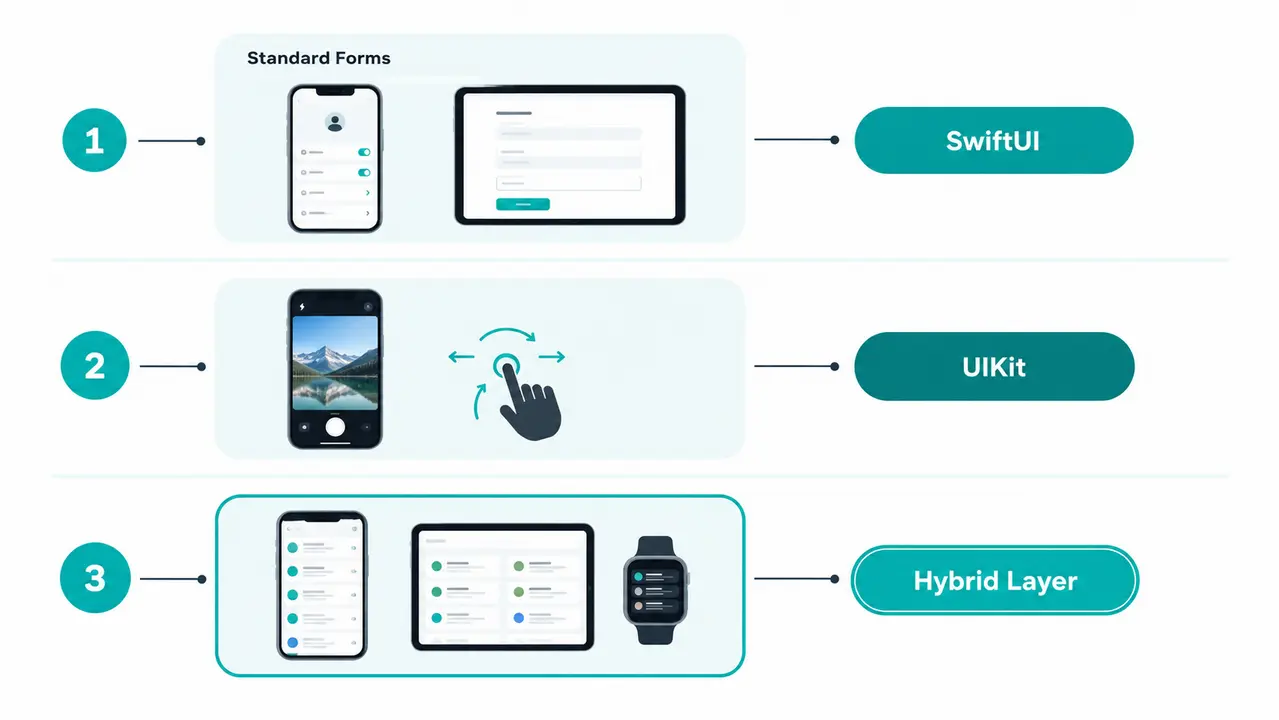
Architectural decisions made during early Swift development dictate refactoring costs twelve months down the road. SwiftUI accelerates form construction and declarative view layouts, but UIKit remains necessary when you build complex gesture interactions or custom video pipelines and when you integrate legacy view controllers. Teams supporting iOS versions older than the previous two releases face missing framework capabilities that require conditional compiler directives.
Forcing SwiftUI into intricate collection layouts or rich text editors causes rendering bugs and frame drops. Generic dev shops write code to pass the sprint. We build software to survive the next platform migration.
This table outlines framework selection criteria across standard application surfaces.
| Application Surface | Recommended Approach | Primary Technical Driver | Testing Strategy |
|---|---|---|---|
| Standard forms and settings | SwiftUI | Fast state binding and declarative layout | Snapshot testing and view inspector verification |
| Custom audio and camera pipelines | UIKit | Direct AVFoundation and CoreMedia lifecycle control | Integration testing on physical hardware targets |
| High-density data feeds | Hybrid UIKit and SwiftUI | Precise cell reuse and asynchronous image caching | Performance profiling and frame drop monitoring |
| Complex interactive canvases | UIKit | Custom gesture recognizers and touch event delivery | Automated XCUITest touch gesture suites |
Maintaining a disciplined boundary between declarative view layers and imperative components keeps your test suites stable. That separation prevents presentation refactors from breaking underlying domain models or business logic.
Pragmatic teams select frameworks screen by screen rather than dogmatically across the entire app.
Native iOS versus cross-platform when you need Apple app features
Choosing a cross-platform framework over native Swift is a sensible decision for simple forms and basic database viewers. The equation changes when your Apple app relies on low-level hardware access, real-time audio streams, or specialized operating system integrations. Framework bridges introduce latency and maintenance overhead every time Apple ships a major platform update.
Native development eliminates translation layers when integrating Apple Pay, HealthKit, or ARKit spatial anchors. For teams working on connected devices, direct access to CoreBluetooth and CoreMotion is essential. In products requiring deep system and embedded engineering, bypassing cross-platform abstractions ensures deterministic memory management and consistent peripheral communication.
Selecting a hybrid wrapper for roadmaps that feature lock screen widgets, Live Activities, or custom interactive notifications leads directly to performance bottlenecks. The native framework handles thread scheduling and memory limits correctly by default.
The week App Store review blocks your release train
A release train that runs smoothly through internal testing can grind to a complete halt inside App Store review. Teams treat submission preparations as administrative overhead instead of core engineering tasks. Apple reviewers test binaries using strict guidelines regarding data collection, functional demo credentials, and declared capabilities.
Production teams maintain an active submission checklist throughout development. This artifact includes localized privacy nutrition labels, a verified video demonstration for background processes, and clear reviewer instructions containing pre-populated test accounts. Every test account must contain representative domain data so reviewers can execute key workflows without hitting empty collection states.
Rejections happen when reviewer notes contain broken credentials or when application privacy declarations contradict network payloads captured during manual inspection. Resolving an unexpected rejection letter takes three to five business days. Incorporating review requirements into your sprint definition of done preserves your scheduled launch window.
TestFlight is not QA and QA is not a phase
Distributing application builds to internal staff through TestFlight gives you qualitative user feedback. It does not replace systematic software verification. Relying on casual employee testing to catch concurrency defects, memory leaks, and interface clipping lets edge-case bugs slip directly into production builds.
Continuous quality assurance requires automated test suites running on every pull request. Our delivery pipelines execute unit tests via XCTest and automated user journeys via XCUITest across simulated and physical targets. This setup runs alongside real-time crash reporting tools that track uncaught exceptions and memory terminations.
A reliable verification matrix must cover physical hardware. Your test grid should include the current flagship models alongside at least one older device class, such as an iPhone SE or an iPhone 11. Testing across varying screen geometries and older processors reveals thread contention and thermal throttling before real users post public reviews.
Backend integration is where iOS timelines slip
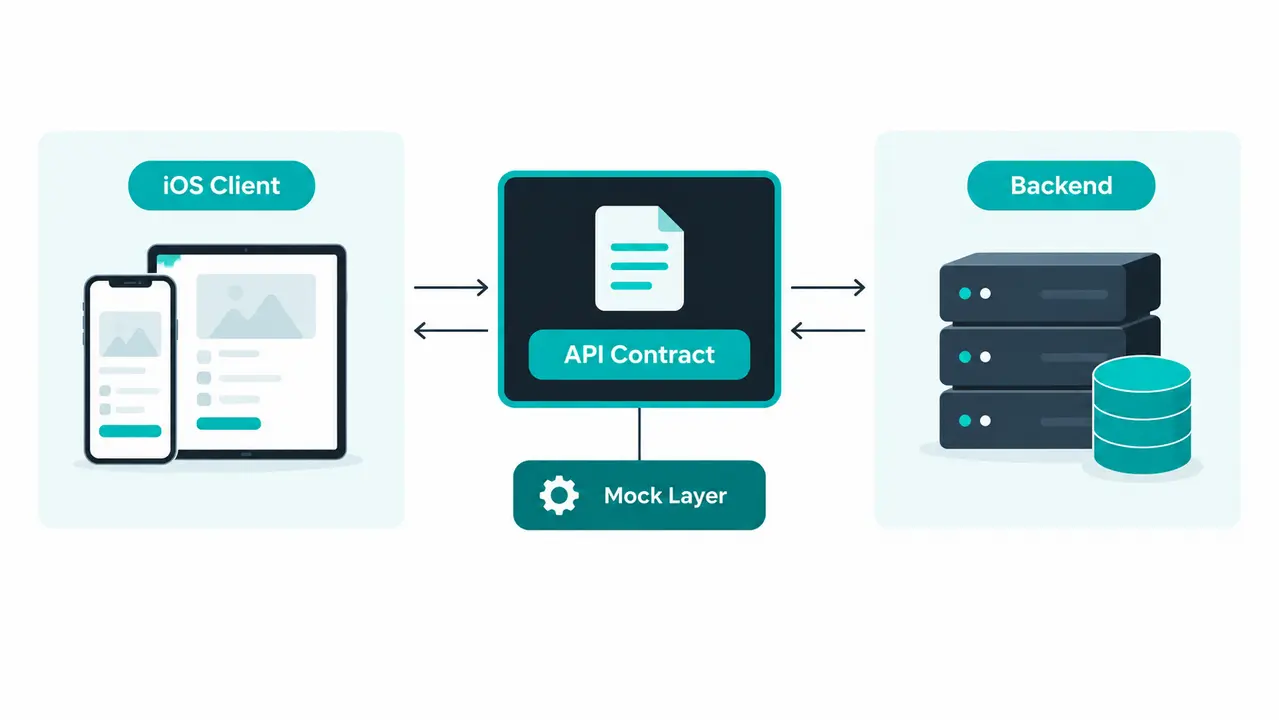
Mobile interfaces feel finished long before the underlying network interactions work reliably. Unresolved authentication flows, ambiguous error payloads, and schema shifts are common causes of mobile delivery delays. When client engineers guess at server responses, the entire delivery cadence falters.
The minimum API contract that keeps mobile teams unblocked
Teams avoid integration stalls by standardizing on an OpenAPI specification before writing UI code. This contract must define REST endpoints, authentication token lifecycles, and rate limiting headers. It also establishes structured error codes alongside sample payloads for critical user flows.
Client engineers generate mock network layers directly from this specification, enabling UI development and automated integration testing without waiting for backend services. Building client interfaces against unverified assumptions produces code that performs well on high-speed office networks but crashes on cellular connections. Establishing clear contracts prevents distributed teams from blocking each other and exposes latency issues before end-to-end testing begins.
Mocking against a rigid specification exposes integration flaws weeks before staging deployment.
Security and privacy work that belongs in the sprint backlog
Security vulnerabilities on iOS rarely stem from cryptographic flaws. They arise from plain text tokens stored in UserDefaults, sensitive customer data printed to system logs, and insecure local caching mechanisms. Treating application security as a post-development audit forces expensive architectural rewrites right before scheduled releases.
Security tasks must sit as explicit user stories inside the development backlog. We enforce secure enclave authentication, store OAuth session tokens inside the system Keychain, and verify that URL loading caches encrypt stored responses on disk. Following the recommendations of the NIST Secure Software Development Framework ensures our teams identify security requirements during early design rather than after the build.
Leaving data governance to late-stage reviews causes severe compliance failures. When operating system prompts request user tracking without matching the disclosures declared in App Store Connect, Apple rejects the binary, delaying your release schedule while engineers rework data collection routines.
iPad support is a product decision, not a checkbox
Checking the iPad compatibility box inside Xcode settings is simple. Supporting iPadOS as a first-class product platform is an entirely different operational commitment. A stretched iPhone layout alienates tablet users, while multitasking and Stage Manager support with multiple windows and pointer interactions requires deliberate architectural planning.
Your engineering leadership must evaluate usage contexts before committing to tablet support. A clear decision rule applies here. iPad support is a core functional requirement when your end users are field technicians, warehouse operators, or clinicians reviewing charts. For consumer utility applications used primarily on the go, tablet support adds unnecessary interface variation that inflates quality assurance costs.
Deciding to support iPad late in development forces extensive rewrites of navigation stacks and layout constraints. Split-view controllers and modal presentations behave differently across window sizes. Defining tablet scope upfront protects your sprint velocity and prevents costly UI redesigns.
Maintenance means surviving the next iOS release without heroics
Every September, Apple releases a major iOS version alongside updated hardware form factors and deprecated software libraries. Mobile software development is an ongoing commitment to platform compatibility. Applications without active maintenance degrade quickly as system frameworks evolve and security baselines shift.
Predictable maintenance relies on structured lifecycle practices. Our delivery processes align with the software lifecycle concepts defined in the IEEE 12207 standard, treating maintenance as an ongoing engineering discipline. This includes running continuous integration pipelines against developer beta seeds of Xcode, managing third-party Swift Package dependencies, and profiling runtime memory usage on newly released devices during public beta cycles.
Ignoring upcoming SDK changes creates frantic emergency rewrites every autumn. When deprecated networking or interface APIs suddenly break on launch day, engineering teams drop planned product features to produce emergency patches, damaging customer trust and team morale.
Recognizing when it is time to modernize an existing iPhone app
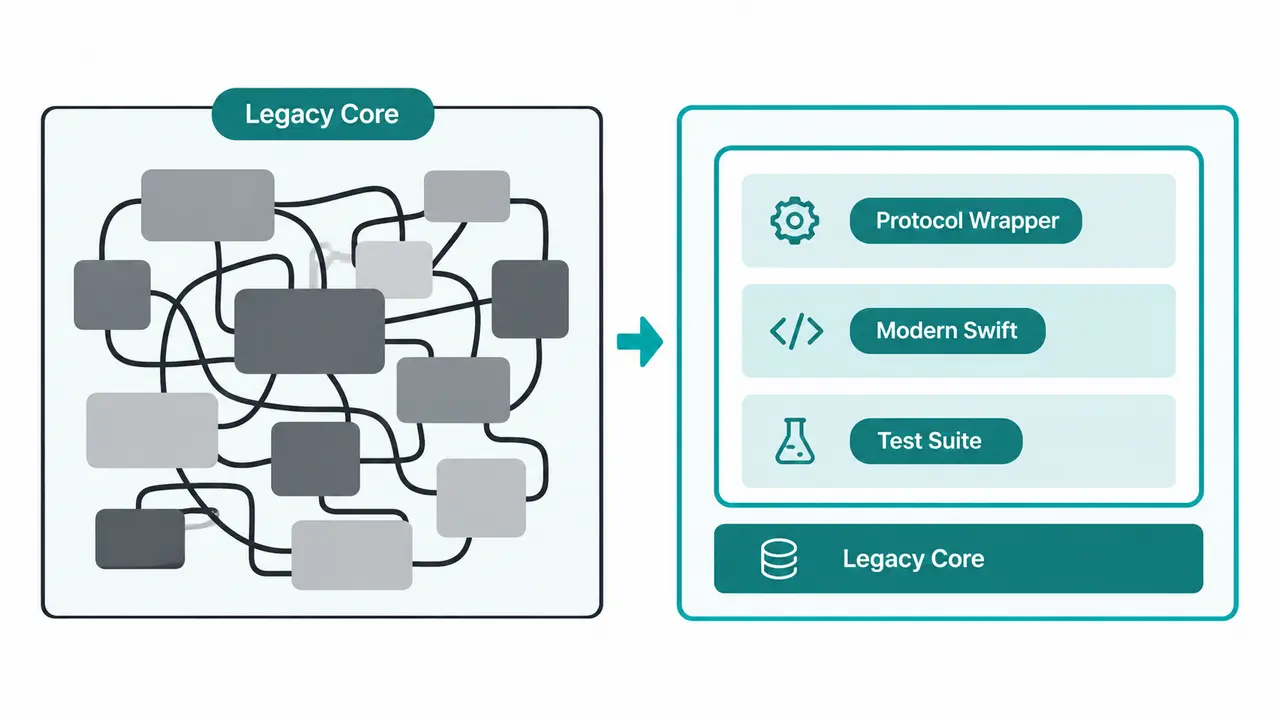
Codebases signal their exhaustion through delivery friction rather than sudden catastrophic failure. The codebase resists your product roadmap when view updates cause regressions in unrelated modules, compile times exceed twenty minutes, or crash-free rates drop below 98 percent.
Rebuilding an entire application from scratch is rarely the right response. Full rewrites halt product delivery for months and inevitably discard years of subtle bug fixes and edge-case handling encoded within the legacy code. We recommend a stabilize-first strategy that wraps legacy modules in clean protocols, implements automated regression tests around critical flows, and replaces brittle screens incrementally using modern Swift patterns.
Signals that demand modernization include unmaintained CocoaPods dependencies, extensive Objective-C bridging headers, and a total absence of automated interface tests. Addressing these bottlenecks systematically restores team velocity without risking the institutional domain knowledge embedded in your operational software.
Handover that does not leave your team guessing
A successful engineering engagement concludes when your internal engineers can independently build, test, and release the mobile application to production. If your staff cannot compile the project from a fresh clone without calling the external vendor, the handover has failed.
True engineering transfer requires tangible operational artifacts. We transfer administrative repository rights, documented Fastlane automation scripts, and provisioning profile configurations alongside secure environment setup guides. Handover sessions must include recorded walkthroughs covering how to add new endpoints, run local unit tests, and resolve distribution signing issues in Xcode.
Traditional agencies treat handover as an exit interview. We treat it as an operational graduation.
Vendors that guard proprietary build steps or retain signing certificates create dangerous dependency traps. Your team ends up trapped in costly support arrangements simply to push basic configuration updates. Insist on continuous repository access and automated build reproducibility from the opening sprint to safeguard technical ownership.
How the three engagement models compare
Selecting an engagement model depends on your internal engineering capacity and product leadership maturity. Pure project delivery suits isolated prototypes, but it creates parallel teams that carry severe handover risks for growing businesses. When scaling an existing platform, augmenting your team or deploying a dedicated engineering pod preserves long-term technical context.
Access to technical talent remains a primary consideration for expanding engineering organizations. Eurostat reported that in 2025, 10.45 million people were employed as ICT specialists across the EU, 5.0% of all employed people. Sentice operates as a boutique engineering partner whose dedicated software engineering teams integrate directly into your internal workflows, standups, and code review cadences.
This table compares how each collaboration model impacts operational control and release management.
| Model Type | Best Use Cases | Risks | Required Client Roles | Handover Risk | Integration Depth |
|---|---|---|---|---|---|
| Project delivery | Isolated prototypes and greenfield standalone tools | Architectural divergence and weak knowledge transfer | Product owner and acceptance tester | High | Low |
| Team augmentation | Filling specific skill gaps and temporary capacity spikes | Management overhead and uneven engineering practices | Engineering manager and tech lead | Low | Moderate |
| Dedicated pods | Long-term product scaling and core platform features | Requires clear roadmap and backlog prioritization | Product manager and technical architect | Low | Deep |
Dedicated engineering pods provide the strongest balance for scaleups. They deliver complete technical autonomy while keeping architectural governance and product strategy firmly inside your organization.
Questions to ask before you commit to an iOS development partner
Portfolio slides and client logos tell you very little about how a vendor writes code under pressure. Technical leaders must evaluate an engineering partner through operational diligence rather than sales presentations. You need to know how their engineers structure pull requests, handle merge conflicts, and manage distribution credentials.
Ask prospective partners to share an anonymized pull request from a recent production project. Inspect whether their engineers write descriptive commit messages, require unit tests for new business logic, and conduct rigorous peer reviews. Inquire about their physical device testing matrix and ask who manages App Store Connect provisioning profiles during release weeks.
Skipping technical diligence results in hiring teams that lack the release discipline required for enterprise software. If a partner cannot explain their branching strategy or relies on manual distribution steps, they will disrupt your release train and compromise code quality.
Rigorous engineering practices matter far more than polished pitch decks.
The documents that keep a distributed iOS build from drifting
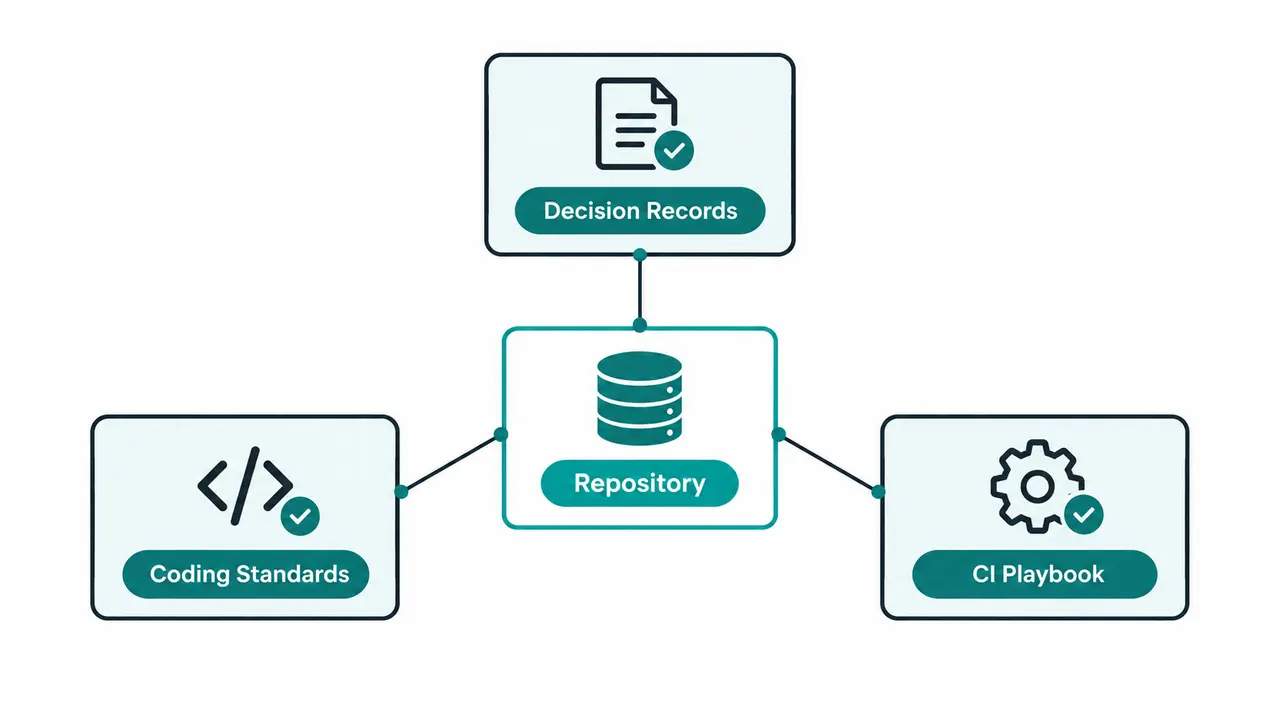
Distributed engineering teams drift into architectural fragmentation when technical decisions live only in Slack threads or video calls. Codebases develop duplicate network managers and conflicting dependency versions when engineers across different time zones work without shared conventions.
Clear technical documentation anchors distributed development. Teams maintain an Architecture Decision Record tracking why specific frameworks, databases, or patterns were chosen. A concise coding standards document outlines naming conventions, error propagation patterns, and Swift concurrency rules. A continuous integration playbook documents build pipeline triggers, signing certificate renewals, and deployment steps.
Relying on tribal knowledge across distributed teams slows feature delivery and confuses new hires. When architectural rules live in the repository alongside the code, engineers review pull requests objectively and make confident changes, so they can ship features without constant real-time coordination.
Written technical consensus prevents expensive refactoring cycles across remote engineering pods.
Frequently asked questions
What is the typical timeline for building a native iPhone app?
A focused initial version typically takes three to five months from discovery through App Store approval. Simple utility tools take less time, and the schedule grows when an application needs custom offline synchronization, audio hardware integration or complex backend systems.
How do you handle an existing codebase during team augmentation?
We start with a thorough technical audit of test coverage, dependency health, and build pipeline stability. Our engineers fix build bottlenecks and establish baseline automated tests before adding new functional features to the legacy repository.
What level of access should the client have to the code repository?
You must maintain complete administrative ownership of the primary git repository from day one. External engineers should work on feature branches through pull requests, ensuring your internal team retains full visibility and continuous control over all code assets.
How are App Store rejections handled during the release process?
Engineering teams address rejections by studying the reviewer’s telemetry logs, reproducing the failure on matching physical hardware, and clarifying metadata or privacy disclosures. Engineers submit technical fixes directly through Resolution Center within twenty-four to forty-eight hours.
What is the difference between a dedicated pod and staff augmentation?
Staff augmentation embeds individual developers directly into your existing team to work under your internal management. A dedicated pod provides a cross-functional unit with engineering, testing, and delivery oversight that works toward agreed milestones while following your technical standards.
The next step for your engineering roadmap
Review your current repository health, build times, and backend contracts before interviewing external development partners. Trading architectural discipline for short-term feature velocity usually creates unmanageable technical debt that stalls future release cycles. The right engineering partner adapts to your production constraints and strengthens your team’s deployment standards. Does your current delivery pipeline give you the confidence to ship an iOS update to production tomorrow morning?
Scope your iOS engineering partnership
Review your repository health, backend contracts, and release process with a senior engineering team before you commit your roadmap to a vendor.
About Sentice

Sentice is a boutique software engineering partner founded in 2013 by Roni Levi and Martin Petkovic, now headquartered in Skopje, North Macedonia. Rather than supplying individual developers, we build embedded teams that blend with a client’s culture, tech stack and goals, working together from a single office under our own technical leadership. We deliver dedicated software engineering teams, end-to-end software solutions, product development, and system and embedded engineering, and we act as technical advisors across the full development lifecycle, from specification and architecture through development, testing and support. We use AI coding tools across every project, and we help clients integrate AI into their own products through chatbots, MCP services, connected application layers and workflow automation. Some of the clients we started with more than a decade ago are still building with us today.
Email: info@sentice.com | Phone: +389 70 307 837